Turn your SketchUp views into design options.

Sound familiar?
An idea needs a clear visual Use a model view to explore a finish or lighting direction before investing in a fully specified rendering.
Changes need a shared reference Keep the same source view when comparing options, so clients can discuss the parts that changed.
Details still need checking AI can move openings or alter furniture. Compare each result with the model before presenting it as a design option.
MoldaSpace changes everything. Professional visualization at your fingertips.
Try the SketchUp image workflow
This exterior example uses the existing MoldaSpace showcase images. Download the 529 × 409 source image to try the steps yourself, or use a clearer export from your own model.

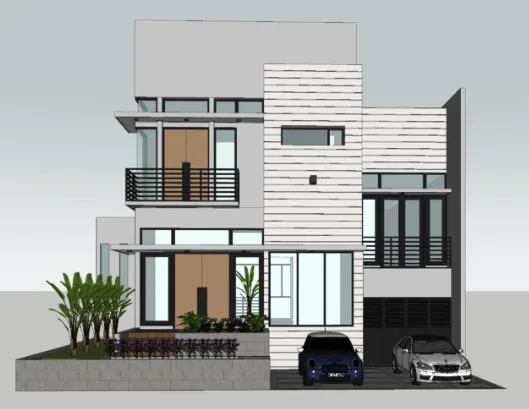
The original generation settings were not recorded. The prompt below is a suggested starting point, not the documented prompt for this showcase. Outputs vary.
- Upload the sample image to a project and select it on the canvas.
- Open Generate, choose a custom prompt, paste the suggestion below and select 2K (1 credit).
- Compare openings, balcony rails, cars and perspective against the source. Change one instruction and generate again only if needed.
Suggested prompt
Create a photorealistic exterior visualization of this house. Keep the camera view, building outline, windows, doors and balconies in their current positions. Use pale stone cladding, natural wood doors, dark metal railings and soft daylight. Do not add floors or openings.
What to check in the result
The showcase changes planting, car details and surface appearance. Inspect architectural details too; the image is a concept, not evidence that dimensions or materials were preserved.
Choose the workflow your project needs
MoldaSpace: image to concept
Start with a 2D view and a prompt. Useful for exploring a visual direction. Review geometry and details after every generation.
Model-based rendering: scene to image
Start with your 3D scene, camera, lights and materials. Use this workflow when exact scene control is essential.
What is MoldaSpace for SketchUp?
MoldaSpace (moldaspace.com) is a browser-based AI visualization tool for interior designers, architects and property professionals. It interprets a 2D image exported from SketchUp and generates a new image guided by your prompt.
Use it to explore materials, lighting and presentation concepts. It does not read or edit the underlying SketchUp geometry, and it is not a SketchUp plugin.
AI can change proportions, openings, furniture or fine details. Keep CAD/BIM and model-based rendering for exact geometry, product specifications and technical documentation.
DESIGN STYLES
Any Style, Instantly
Transform your space into any design aesthetic with a single click.

Japandi

Scandinavian

Industrial

Mid-Century

Minimalist

Bohemian
YOUR NEW CAPABILITIES
Everything you need to visualize faster.
Work from your existing view
Upload a PNG, JPG or screenshot. Native .skp files are not supported; export an image first.
Describe the change
Specify materials, lighting and the parts to retain. Start with one change so the result is easier to assess.
Compare alternatives
Review generated images alongside the source. Timing and output vary; repeated generations use credits.
Try it before choosing a plan
Start with the free trial. Current credit packs and monthly plans are listed below; 2K generation uses 1 credit and 4K uses 2.
Tips for Great SketchUp Renders
- Export at high resolution (at least 1920x1080) for best AI interpretation
- Use SketchUp's parallel projection for architectural elevations
- Include context like landscape and sky in your SketchUp scene
- Export multiple camera angles to generate comprehensive visualization packages
- Use descriptive prompts specifying materials, lighting mood, and time of day
- Keep geometry clean—AI interprets cleaner models more accurately
Common Mistakes to Avoid
- Exporting with SketchUp's default white background—include sky for better context
- Using very low resolution exports that lose geometric detail
- Overcrowding the scene—simpler compositions often render better
- Not specifying desired materials in the prompt—be explicit about finishes
- Expecting exact material matches—AI generates representative realistic materials
Frequently Asked Questions
Can I upload a .skp file?
No. Export a PNG or JPG, or capture a clear screenshot of your SketchUp view, then upload that image. You do not need to install a MoldaSpace plugin.
Does it preserve exact geometry?
No guarantee. A prompt can request that walls, openings and perspective stay unchanged, but AI may still alter them. Check the result against the model before sharing it.
Can it match a specific furniture product or material?
Treat generated furniture and finishes as visual approximations. Verify exact products, dimensions and specifications separately.
How much does a generation cost?
A 2K generation uses 1 credit; 4K uses 2. The free trial and current pack or subscription prices are shown below. Further attempts consume additional credits.
What if I use SketchUp in the browser?
The input is a 2D image, so a clear screenshot works when your version does not offer the export you need. Set your camera view before capturing it.
When should I use a model-based renderer?
Use a renderer that reads your 3D scene when you need precise geometry, camera and material control. MoldaSpace is useful for visual exploration from an image; it does not replace the source model or technical checks.
PRICING
Choose credits for the way you work.
Prices in USD.
Buy a one-time pack or choose a monthly subscription. Each 2K generation uses 1 credit; each 4K generation uses 2. Creating another version uses additional credits.
Creator
Monthly subscriptions50 credits per billing cycle
Subscription credits expire at the end of each billing cycle. Unused subscription credits do not roll over.
Studio
Monthly subscriptions300 credits per billing cycle
Subscription credits expire at the end of each billing cycle. Unused subscription credits do not roll over.
Scale
Monthly subscriptions2,000 credits per billing cycle
Subscription credits expire at the end of each billing cycle. Unused subscription credits do not roll over.
Standard
One-time packs40 credits (one-time)
One-time pack credits do not expire while your account remains active.
Starter
One-time packs10 credits (one-time)
One-time pack credits do not expire while your account remains active.
Start with 5 Free Credits. No credit card required. For eligible new accounts. Each 2K generation uses 1 credit; each 4K generation uses 2. Creating another version uses additional credits. The number of generations available depends on the resolution you choose.
Ready to visualize faster?
Start creating today.
Stop losing projects because you can't visualize fast enough.
Start with 5 Free Credits. No credit card required. For eligible new accounts. Each 2K generation uses 1 credit; each 4K generation uses 2. Creating another version uses additional credits. The number of generations available depends on the resolution you choose.