A Designer's Guide to Photorealistic Rendering Software
Think of photorealistic rendering software as a digital photography studio for designs that haven't been built yet. It's the magic that turns a technical 3D model into an image so lifelike you could mistake it for a real photo.
For architects and designers, this technology is a game-changer. It lets you show clients exactly how a finished kitchen, office lobby, or entire building will look and feel, long before a single brick is laid.
What is Photorealistic Rendering, Really?
Imagine handing your client a photograph of a building that, for now, only exists as a file on your computer. That’s what rendering software does. It closes the gap between an abstract blueprint and a tangible, emotional experience anyone can connect with. This isn't just about making things look good; it's one of the most powerful communication tools in a designer's arsenal.
Instead of asking clients to decipher floor plans and imagine the final space, you can simply show them. It’s a process that breaks down into a few key stages:
Modeling: First, you build the digital skeleton—the 3D structure of the space or object.
Texturing: Next, you "paint" it with realistic materials. This is where you apply the specific grain of an oak floor or the subtle imperfections of a concrete wall.
Lighting: You then set up virtual lights to simulate how sunlight from a window or a lamp on a table would actually behave, casting accurate shadows and creating realistic reflections.
Capturing: Finally, you place a virtual camera to compose the perfect shot, just like a professional photographer scouting the best angle.
Why Does This Matter So Much?
This move toward ultra-realistic visuals isn't just a trend; it's a massive business advantage. The market for visualization and 3D rendering software hit USD 3.03 billion in 2024 and is expected to explode to USD 16.50 billion by 2034. The numbers speak for themselves.
Interior designers who use photorealistic visuals often get client sign-offs up to 40% faster. In real estate, property listings that feature high-quality renders see 68% higher engagement than those with just standard photos. You can find more insights on the visualization and 3D rendering software market on zionmarketresearch.com.
When you present a crystal-clear, realistic vision, you remove guesswork and build immediate trust. Stakeholders can see exactly what they're getting, which speeds up decisions and dramatically reduces the risk of expensive changes down the road.
From a Sketch to a Signed Contract
At its heart, this technology helps you tell a better story. You can effortlessly experiment with different materials, lighting setups, and design styles, showing clients a few distinct options to help them land on their perfect vision.
This isn't just about getting approvals. It's about turning a technical presentation into an exciting, collaborative session that solidifies your role as an expert guide. It ensures the final project is perfectly aligned with the client’s dream from the very beginning.
Exploring Different Rendering Techniques
Not all photorealistic rendering software works the same way. The technology that powers these incredible images generally falls into two major camps, each built for different phases of the design journey. Getting a handle on the difference is crucial for picking a tool that actually fits your workflow, deadlines, and project goals.
Think of it like choosing between a professional, planned-out photoshoot and a live, interactive video call. Both create visuals, but they serve completely different purposes, operate at different speeds, and deliver very different results.
Real-Time vs Offline Rendering At a Glance
The two primary methods for generating images are real-time and offline rendering. Each has its strengths, and the best choice really depends on what you need to accomplish at any given moment—whether it's getting quick feedback on a layout or creating a stunning hero shot for a marketing brochure.
This table breaks down the core differences at a high level.
| Attribute | Real-Time Rendering | Offline (Pre-Rendered) Rendering |
|---|---|---|
| Speed | Instantaneous (generates frames per second) | Slow (minutes to hours per image) |
| Primary Use | Interactive walkthroughs, VR, design reviews | Final marketing images, animations, portfolio shots |
| Interactivity | High—users can move and make changes instantly | None—the image or video is static once created |
| Quality | Very good, but can involve shortcuts for speed | Uncompromised, highest possible physical accuracy |
| Hardware Needs | Requires a powerful GPU for a smooth experience | Can be done on CPUs or GPUs, often using cloud render farms |
Ultimately, the choice isn't about which one is "better" overall, but which one is the right tool for the job at hand. Many modern design workflows actually use both: real-time for the messy, creative middle and offline for the polished, final presentation.
Offline Rendering: The Digital Photoshoot
Offline rendering, often called pre-rendering, is the traditional workhorse of architectural visualization. This method is like a meticulous studio portrait session for your 3D model. It takes its sweet time—sometimes hours—to calculate every single ray of light, every subtle reflection, and every complex shadow with absolute precision.
The result? Flawless, high-resolution images that are pixel-perfect. Because the software isn't trying to give you instant feedback, it can pour all its computational power into achieving the highest level of realism imaginable. This makes it the only choice for final marketing materials, hero shots for your portfolio, or competition entries where quality is everything.
Real-Time Rendering: The Interactive Walkthrough
On the flip side, real-time rendering is more like a live video feed of your design. Its whole purpose is speed and interactivity. Instead of waiting hours for a single frame, it generates visuals on the fly, letting you and your client walk through a digital space as if you were playing a high-end video game.
This immediate feedback is a game-changer for collaborative design sessions. You can swap out materials, adjust the sun's position, or move furniture around and see the results instantly. While this speed used to mean a noticeable drop in visual quality compared to offline methods, modern real-time engines are closing that gap at a truly astonishing pace. To see how this tech is applied, check out our guide on SketchUp rendering solutions that put these principles to work.
The core trade-off is simple: offline rendering prioritizes ultimate quality at the cost of time, while real-time rendering prioritizes instant feedback and interactivity, making it ideal for the iterative design phase.
The Science Behind the Magic: Ray Tracing
One of the key technologies driving realism in both offline and real-time rendering is ray tracing. It’s a brilliant but simple concept: imagine your computer shooting out millions of virtual light rays from the "camera" into your 3D scene. The software then traces the path of each individual ray as it bounces off surfaces, refracts through glass, or gets absorbed by different materials.
By simulating the actual physics of light, ray tracing creates incredibly believable shadows, reflections, and lighting effects that are almost impossible to fake with older methods. This process is seriously demanding on your hardware, which is why it was historically limited to slow offline rendering. Thanks to major advances in GPUs and software, we can now get the magic of ray tracing in real-time.
This diagram shows how all the key pieces—the model, materials, lighting, and camera—come together in the rendering process.
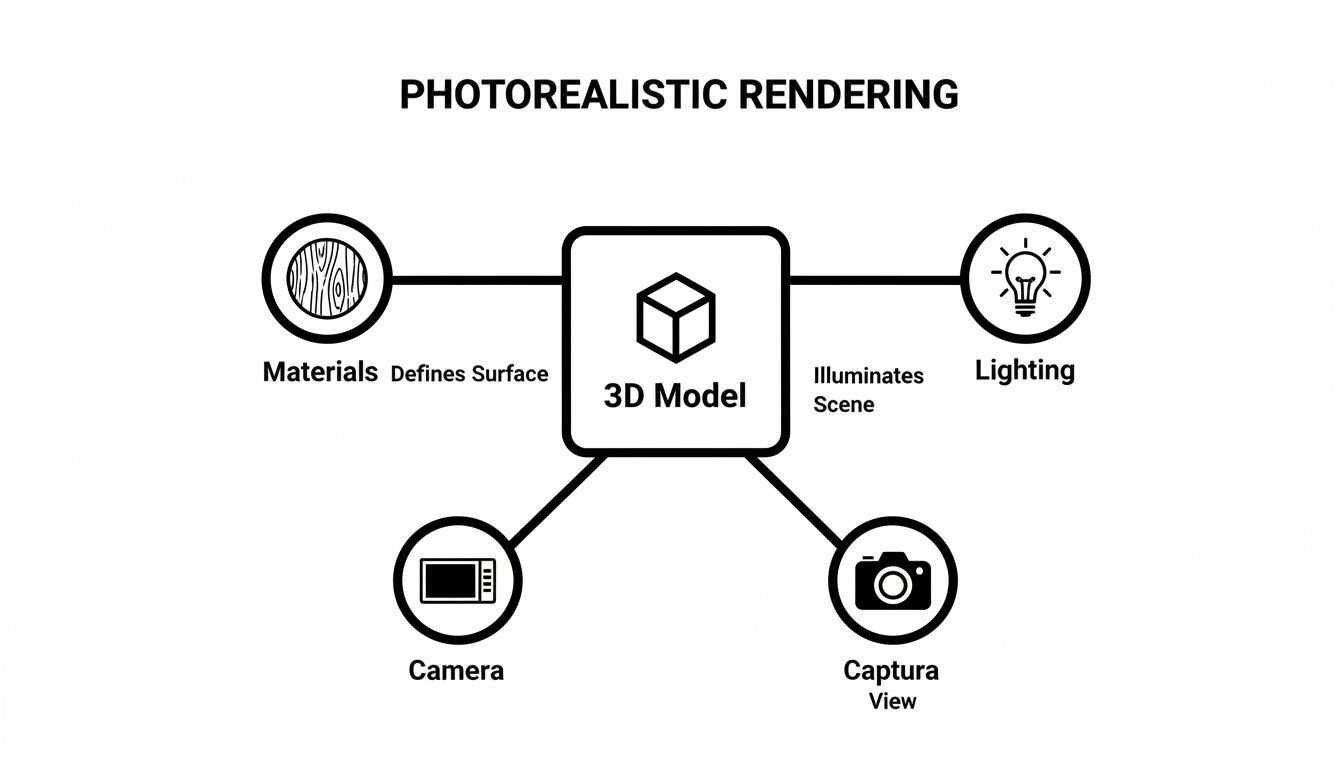
As you can see, a truly photorealistic image is born when a detailed 3D model, accurate materials, and physically correct lighting are all captured through a virtual camera lens.
The New Frontier: AI-Powered Rendering
A new and exciting category is emerging that blends the best of both worlds: AI-driven rendering. These tools use machine learning models, trained on millions of images, to interpret your 3D model, a rough sketch, or even a text prompt and generate a photorealistic result in seconds.
Instead of painstakingly calculating light rays, the AI uses its vast visual database to essentially "paint" a realistic scene. This approach completely changes the workflow, allowing designers to churn out dozens of high-quality design variations in the time it used to take to produce a single traditional render. It’s an incredibly powerful way to handle early-stage concepts, get quick client feedback, and even tackle virtual staging.
What to Look For: Essential Features for a Seamless Workflow
The best rendering software doesn't feel like software at all. It should feel like a natural extension of your design process, a tool that gets out of the way and lets you create, rather than another technical beast you have to tame. If you're fighting with clunky menus or frustrating limitations, it's killing your creative spark.
To make sure a tool actually helps instead of hinders, there are a few non-negotiable features every designer and architect should look for. These are the core components that work together to breathe life into a sterile 3D model, turning it into something that feels real and convincing.
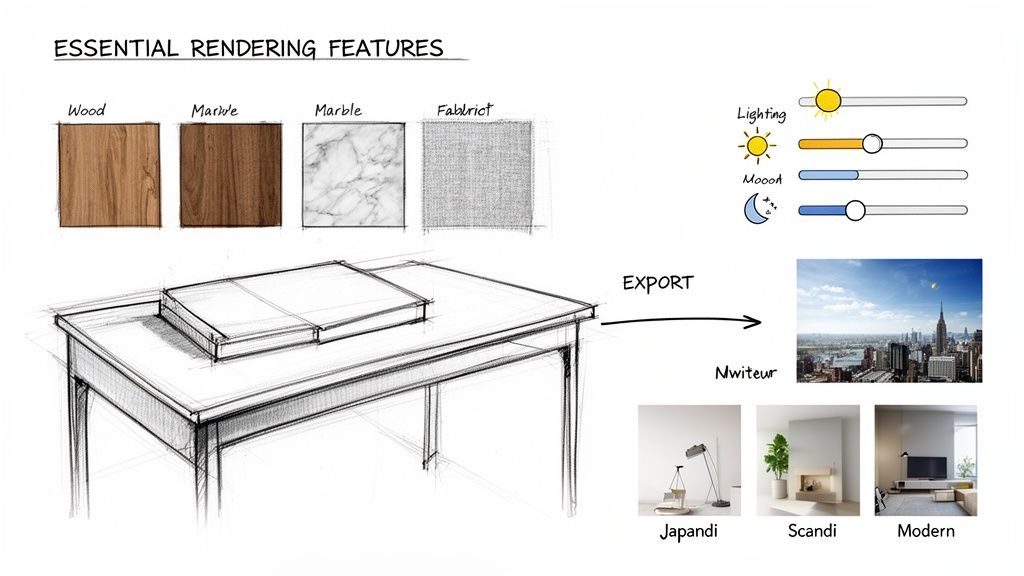
Rich Material and Asset Libraries
The soul of a realistic image is in its materials. A high-quality material library is your foundation for believability, letting you drag and drop convincing surfaces without having to build them from scratch. Think of it as your own digital showroom, stocked with every finish you can imagine.
Instead of spending hours trying to perfect a wood grain, you can simply pull one from the library. The best ones offer:
Extensive Material Options: A huge selection of woods, metals, fabrics, and plastics that react to light just like their real-world counterparts.
High-Resolution Textures: This is crucial. You need textures with enough detail to show subtle imperfections—the faint scuffs on a floor or the brushed texture of steel—that trick the eye into seeing realism.
3D Asset Integration: A good library of pre-made models like furniture, plants, and décor is a lifesaver. It allows you to populate an empty room and make it feel lived-in in a matter of minutes.
Intuitive Lighting and Environment Controls
Lighting is what gives a scene its mood. It's the difference between a flat image and a dramatic one. Good software lets you become a virtual photographer, sculpting the scene with light to create an emotional connection. We're talking about more than just a simple brightness slider; we're talking about real control.
You need tools that make it easy to manage complex lighting, whether you’re faking the warm glow of an afternoon sun or balancing a dozen interior lights. Just as important are the environment settings that place your design in a realistic context, like a busy city street or a quiet forest.
A great lighting system lets you tell a story. It can make a small room feel cozy and inviting or a large hall feel grand and imposing, all by adjusting the angle, color, and intensity of virtual lights.
Seamless Workflow Compatibility
This might be the most important feature of all. How well does the rendering tool actually play with your primary modeling software? A clunky workflow that forces you through complicated export and import steps is a massive time-waster and a total creativity killer. The goal should always be a smooth, frictionless path from your model to the final image.
Modern rendering tools absolutely have to prioritize this. They should work effortlessly with the programs you already use every day. Look for:
Direct Plugins: Live-sync plugins for tools like SketchUp, Revit, or Rhino are game-changers. They let you see rendering updates in real-time as you make changes to your model.
Broad File Support: It has to easily import common file types (like .skp, .fbx, .obj) without messing up your textures, scale, or geometry.
Cloud-Based Processing: This is becoming a standard for a reason. Offloading the heavy lifting to the cloud frees up your computer so you can keep working, and it means you don't need a supercomputer to get high-quality results.
For example, picture an interior designer finishing up a client's kitchen in SketchUp. With a deeply integrated AI renderer, they can send the model off and, in under a minute, get back multiple photorealistic options in styles like Japandi, Scandinavian, and Industrial. This completely changes the client presentation from a simple "yes or no" into an exciting, collaborative session where decisions get made on the spot.
How to Choose the Right Rendering Software
Picking the right rendering software can feel overwhelming. You're hit with a wall of technical jargon, competing features, and a dozen different pricing plans. How do you cut through the noise?
The secret is to ignore the marketing hype for a moment and focus on what you actually need. A massive architectural firm has very different demands than a freelance interior designer, so the "best" tool is the one that fits your specific workflow, not the one with the longest feature list.
To make a smart decision, let's break it down into four key areas. By scoring each software option against these pillars, you’ll get a clear picture of what works for your projects, your clients, and your budget.
The Four Pillars of Evaluation
Think of this as a balancing act. The software that delivers breathtaking, pixel-perfect quality might take ages to render and have a learning curve a mile long. Another might be incredibly fast and easy to use but not quite hit that top tier of realism. The goal isn't perfection in all four categories; it's finding the right balance for you.
Here are the four pillars to build your decision on:
Quality of Output: How realistic do your renders need to be? Are you making quick, conceptual mockups to explore ideas, or are you creating the hero shot for a luxury real estate brochure?
Rendering Speed: How fast do you need to work? If your clients expect to see changes on the fly during a meeting, speed is everything. If you have the luxury of letting a render cook overnight, you have more options.
Total Cost: What’s your budget, and how do you prefer to pay? Are you looking for a predictable monthly subscription, a one-time purchase, or a flexible pay-per-render model that ties costs directly to your workload?
Ease of Use: How much time can you realistically sink into learning a new tool? Do you need something you can pick up in an afternoon, or are you ready to tackle the steep learning curve of a complex, industry-standard program?
For example, a traditional powerhouse like V-Ray is famous for its incredible quality, but it often demands serious training and high-end hardware. On the other hand, newer AI-driven tools are often built for pure speed and simplicity, putting high-end results within reach for designers who aren't rendering specialists.
Asking the Right Questions
Before you even download a free trial, take a moment to look at your own process. Answering these questions will give you a personal checklist to filter out the wrong tools and zero in on the right ones.
How many design changes do my clients usually ask for? (If it's a lot, you need speed.)
Is my main goal interactive client reviews or polished marketing images? (This points to real-time vs. offline rendering.)
What’s my budget per project, or what can I afford monthly? (This clarifies the right cost model.)
Do I have time to watch hours of tutorials, or do I need to be productive on day one? (This is all about ease of use.)
Will this software play nicely with my 3D modeling program? (Crucial for a smooth workflow.)
By figuring out your own priorities first, you stop being a passive shopper and become an informed decision-maker. The software should bend to fit your process, not the other way around.
Understanding Modern Cost Models
The way we pay for software has changed, too. The architectural rendering market is set to grow by USD 2.21 billion between 2024 and 2029, and a huge part of that is the shift to subscriptions, which now make up nearly 40% of the market share. You can read more about the growth of the architectural rendering software market on technavio.com.
This move away from giant, one-time license fees is fantastic for smaller studios and freelancers. It opens the door to powerful tools without a massive upfront investment. For real estate, this is especially important for virtual staging, where properties staged digitally are known to sell up to 73% faster.
New models like pay-as-you-go credits give designers access to world-class tools on a project-by-project basis. It levels the playing field, allowing a solo designer to create visuals that can go head-to-head with those from a huge firm. In the end, finding the right software is about matching its strengths to your studio's real-world needs and creative goals.
Real-World Applications for Designers and Realtors
It’s one thing to talk about the technology, but where photorealistic rendering software really shines is in solving everyday problems for professionals on the ground. This isn't just about making pretty pictures; it's a tool that directly builds client trust, speeds up projects, and ultimately, closes deals.
For architects and interior designers, rendering is the bridge between a 2D floor plan and a client's emotional connection to a space. For real estate agents, it's about transforming a vacant, uninviting house into a home a buyer can't wait to see. Let's dig into how this plays out in the real world.
Securing Client Buy-In and Winning Projects
Walk into your next client meeting with a lifelike image of their future space, not just blueprints. Imagine an architect showing not just the dimensions of a new extension, but exactly how the afternoon sun will pour through the windows. That single image can shift the conversation from technical jargon to how the space will feel.
When clients see the end result with such vivid clarity, the guesswork disappears. This builds a tremendous amount of trust and often becomes the deciding factor that wins you the project over a competitor.
A compelling render removes the fear of the unknown. It answers unasked questions and helps clients feel excited and secure in their investment, leading to faster approvals and fewer costly revisions down the line.
Better yet, you can present multiple high-quality design variations. Show them the sleek, modern kitchen versus the warm, traditional one. By showcasing what’s possible, you open the door to upselling your services and expanding the project's scope—all backed by visuals they’ve already fallen in love with. You can find more ideas in our dedicated resources for interior designers using visualization tools.
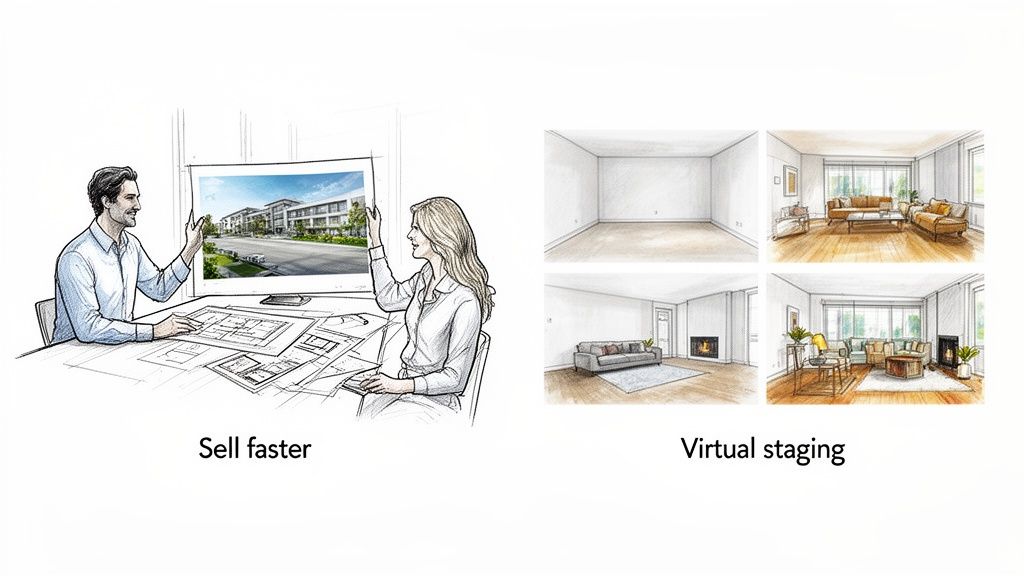
Transforming Real Estate with Virtual Staging
An empty property is a tough sell. Blank rooms feel cold, it's hard to judge their size, and most buyers struggle to imagine their life there. This is where virtual staging completely changes the game.
Instead of spending thousands on physical furniture rentals, an agent can digitally furnish photos of an empty condo. In minutes, you can create different looks for the same space to appeal to specific buyers:
For young professionals: Think sleek, minimalist furniture and clean lines.
For growing families: Go for a cozy, welcoming vibe with comfortable seating and warm textures.
For luxury buyers: Showcase an elegant, high-end design with sophisticated decor.
These virtually staged photos are marketing gold for online listings and social media. They help buyers form an emotional connection before they even walk through the door, leading to more showings and faster sales. This trend is a major reason the global 3D rendering services market is projected to hit $61,651.18 million by 2026, with the residential sector leading the charge. Read more about the growth of 3D rendering services and its market impact.
So, When Does an AI Rendering Tool Actually Make Sense?
Making the jump to an AI-driven workflow can feel like a big decision. But if you look closely, there are usually clear signs that it’s the right time for your business. An AI tool isn’t just a faster version of traditional photorealistic rendering software; it’s built to solve a very specific set of problems that often bog down designers, architects, and real estate pros.
Are you constantly fighting the clock? Struggling with a tight budget? Or maybe you just don’t have the bandwidth to become a rendering guru on top of everything else? If that sounds familiar, an AI solution could be exactly what you need. These tools are all about making high-quality visuals accessible, giving solo designers and smaller studios the firepower to create images that can stand up against those from big-name firms.
Think about it: a freelance interior designer can now show a client ten different style concepts in the time it used to take to produce one painstaking traditional render. That’s a game-changer for speeding up approvals.
Scenarios Where AI Rendering Is the Clear Winner
Let’s get specific. If any of these common frustrations hit close to home, it’s a strong signal that AI could be your secret weapon. AI rendering truly shines when your main goal is to move fast and explore ideas without a massive time penalty.
You should seriously consider an AI tool if you're:
A Solo Designer or Small Studio: You need to produce incredible visuals to compete, but you don't have a rendering specialist on staff. AI levels the playing field, fast.
Stuck in an Endless Loop of Revisions: Your clients love to see "just one more option." AI lets you generate new concepts in minutes, not days, keeping the project moving forward.
A Real Estate Agent Needing Instant Staging: You’ve got photos of an empty house and need to whip up stunning, furnished marketing images today to get buyers in the door.
Working with a Lean Budget: You can’t justify expensive software licenses or the high-powered hardware needed for traditional rendering. Pay-as-you-go AI models mean you only pay for what you actually use.
The real magic is efficiency. An AI workflow is at its best when you need to turn a simple sketch, a basic 3D model, or even a plain photo into a polished, photorealistic image in under a minute.
Matching the Tool to Your Goals
In the end, it all comes down to what you’re trying to achieve. Traditional software gives you absolute, pixel-perfect control, which is fantastic for that one final, hero shot for a marketing campaign.
But for the day-to-day grind of design work—the brainstorming, the client feedback, the constant back-and-forth—AI offers a combination of speed, quality, and cost-effectiveness that’s hard to beat. You can learn more about how to leverage AI rendering for your projects to see how it might fit your own professional goals.
If winning more projects depends on showing more ideas and getting faster feedback, all without breaking the bank, then an AI-powered rendering tool is no longer a "nice-to-have." It’s a real strategic advantage that lets you focus on what you do best: design.
Got Questions? We've Got Answers
Stepping into the world of photorealistic rendering can feel a little overwhelming. You've probably got some practical questions about what it takes to get started, from the computer you'll need to how much it all costs. Let's clear up some of the most common questions architects and designers have.
Do I Really Need a Super-Powerful Computer to Create Renders?
That used to be the case, but not anymore. It all comes down to the software you pick.
Traditional rendering engines are notorious resource hogs. They lean heavily on your computer's CPU and GPU to do the complex math required for realistic lighting and shadows, often locking up your machine for hours. For that kind of work, a pricey, high-end workstation is pretty much non-negotiable.
But the game has changed. Modern cloud-based and AI tools handle all the heavy lifting on their own powerful servers.
This is a huge deal. It means you can create breathtaking, high-resolution images in seconds, all from a standard laptop. Suddenly, top-tier rendering is available to anyone, not just the studios with big hardware budgets.
What's the Typical Cost for Rendering Software?
The price tag on rendering software is all over the map. Some of the old-guard programs demand a hefty one-time license fee that can run into the thousands. More commonly now, you'll find monthly or annual subscriptions that can range anywhere from $50 to over $200 per month.
A newer, more flexible option is the pay-as-you-go credit system you see with many AI platforms. This model is a lifesaver for freelancers and smaller firms because it gets rid of fixed monthly bills. You just buy credits when you need them, so your software costs line up perfectly with your actual project work.
Can I Bring My Own 3D Models into These Programs?
Absolutely. In fact, you should insist on it. Any good rendering software is built to work seamlessly with the 3D modeling tools you already rely on. A smooth import process is key to a productive workflow—it's what saves you from hours of technical headaches.
Before you settle on a new tool, make sure it plays nicely with your existing software. Look for direct plugins or support for common file formats from programs like:
When your 3D model can jump into the rendering stage without a hitch, you get to spend your time on what really matters: the creative vision for your design.
Ready to see how an AI-powered workflow can completely change your design process? MoldaSpace takes your 3D models and sketches and turns them into stunning, lifelike visuals in under a minute. Try MoldaSpace for free and create your first render today.
Article created using Outrank