BIM for Architects From Concept to Construction

For architects, Building Information Modeling (BIM) is a process that completely reframes how we think about design. It's a move away from producing stacks of 2D drawings and toward creating a single, intelligent, data-rich 3D model of a building. This digital model becomes the one and only source of truth for the entire project.
What Is BIM and Why It Changes Everything for Architects
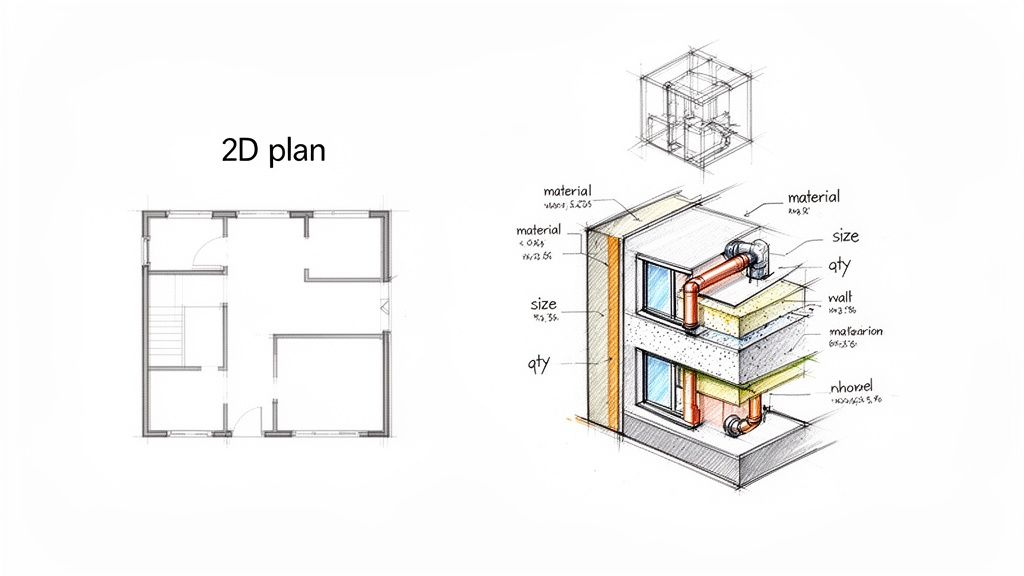
Think about the difference between a photograph of a building and a fully interactive, to-scale replica. The photo shows you what it looks like, but the replica can be taken apart, analyzed, and tested. That’s the core difference between a traditional 2D CAD workflow and BIM for architects.
This jump from drawing to modeling is one of the biggest shifts in architectural practice in the last few decades. A wall is no longer just two parallel lines on a floor plan; it's a smart object that knows its material, its height, its fire rating, and its relationship to the floor slabs and windows around it.
Beyond the 3D Model
A common mistake is thinking BIM is just a fancy 3D model. While the visual component is powerful, the real magic is in the "I"—the Information. This data-driven foundation means the model is packed with layers of crucial details, such as:
- Material specifications like concrete strength or window U-values
- Manufacturer details and specific product model numbers
- Cost data for real-time budget tracking
- Phasing information for building a realistic construction schedule
This is the critical distinction: BIM isn’t just 3D modeling. It’s creating a central, reliable database that informs every decision, from the first sketch to long-term facility management.
The table below breaks down just how different these two approaches are in day-to-day practice.
Traditional 2D CAD vs Modern BIM Workflow
| Aspect | Traditional 2D CAD | BIM Workflow |
|---|---|---|
| Core Concept | A collection of separate 2D drawings (plans, sections, elevations). | A single, integrated 3D model containing all project data. |
| Data | Geometric lines, arcs, and text with no inherent intelligence. | Intelligent objects with geometric and non-geometric data (e.g., materials, cost). |
| Changes | Manual updates required across every affected drawing. Highly error-prone. | Change it once, and it updates everywhere automatically (plans, sections, schedules). |
| Collaboration | Disjointed. Teams work on separate files, leading to coordination issues. | Centralized model allows for simultaneous, coordinated work. |
| Clash Detection | A manual, visual process (e.g., overlaying drawings on a light table). | Automated process that identifies conflicts between systems (e.g., ductwork hitting a beam). |
| Output | Primarily 2D construction documents. | 2D drawings, 3D visualizations, data schedules, and analysis reports from a single source. |
Working in a BIM environment simply gives architects, engineers, and contractors a much clearer, more reliable picture of what's being built before a shovel ever hits the ground.
The Impact on Architectural Practice
Adopting BIM fundamentally reshapes an architect's daily work. The focus shifts from the tedious grind of drafting to making higher-level strategic decisions. When you move a wall in a floor plan, every section, elevation, and door schedule updates automatically. This alone eliminates countless hours of manual coordination and dramatically reduces the risk of human error.
The benefits are real and measurable. With a global market projected to grow from USD 9.12 billion in 2025 to USD 10.27 billion the following year, BIM's value is undeniable. Architects make up the largest slice of this market, holding a 43.60% share, and for good reason. Using features like clash detection, firms can spot problems early, cutting construction delays and rework by up to 30%.
Ultimately, BIM allows architects to design with greater intelligence and confidence. By marrying visual design with hard data, it clears the way for better collaboration, fewer surprises on site, and more energy to focus on what matters most—great design. This process is a natural fit for modern architectural visualization and design workflows.
The Core Benefits of Adopting a BIM Workflow
Switching to a Building Information Modeling process is about much more than just a different way to draw. It’s a fundamental upgrade to how an architecture firm operates, with real-world advantages that boost efficiency, profitability, and client happiness. It’s like ditching a paper map for a live GPS—one shows you the destination, but the other anticipates traffic, finds better routes, and feeds you live data to make the journey smoother.
This shift gives architects the power to design with far more confidence and clarity. By embedding all the critical project data directly into the model, a BIM workflow changes the game for problem-solving, communicating your vision, and taming the complexity of a modern construction project. It's all about making smarter decisions much earlier in the timeline, right when they count the most.
Fostering True Project Collaboration
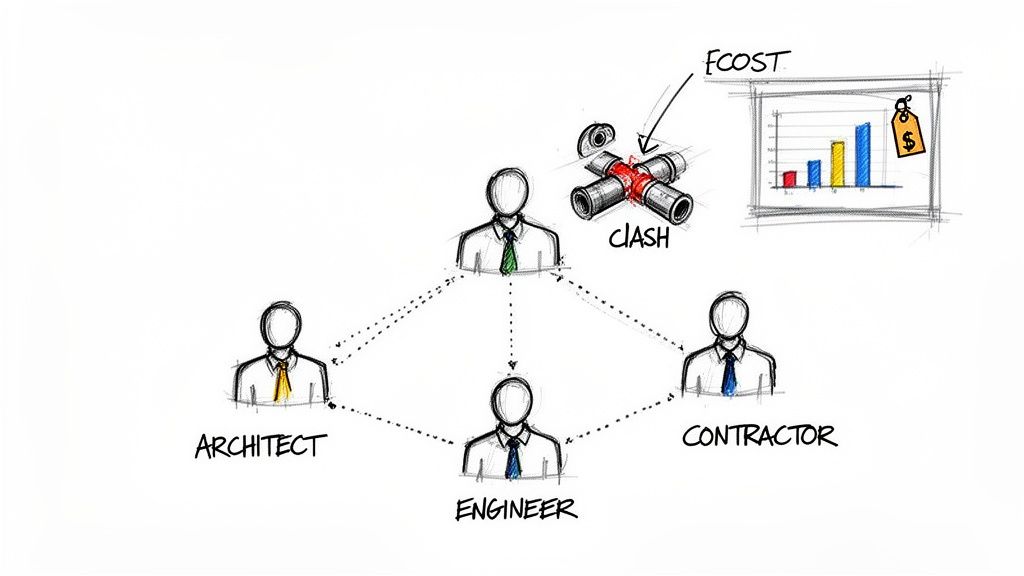
One of the first things you'll notice with BIM for architects is how dramatically it improves teamwork. The old way of doing things often meant architects, structural engineers, and MEP specialists were stuck in their own separate files. These information silos are a breeding ground for misunderstandings and coordination mistakes that don't get discovered until boots are on the ground.
BIM breaks down those walls. It establishes a central, unified model that becomes the single source of truth for the entire project team. Everyone is working from the same live dataset, so all disciplines stay perfectly in sync. If you adjust a ceiling height, the HVAC engineer immediately sees how it affects their ductwork. This shared environment cuts down on the frustrating back-and-forth and stops miscommunications before they can throw a project off schedule.
Ultimately, this collaborative approach just makes for a smoother, more cohesive design process by reducing the natural friction between different disciplines.
Eliminating Errors with Automated Clash Detection
What if you had a digital safety net that could catch critical construction mistakes before they ever happened? That's exactly what automated clash detection does. This feature alone is a massive win for BIM, saving projects from the headaches and high costs of rework.
The software systematically scans the integrated model, hunting for any spot where building systems interfere with each other—or "clash." It will instantly flag a structural beam running through a planned plumbing line or HVAC ducts trying to occupy the same space as electrical conduits.
In a 2D world, you often don't find these clashes until construction is already underway, leading to painful delays and budget overruns. With BIM, you solve these conflicts on a screen during the design phase, when making a change is simple and cheap.
This proactive risk management is one of the strongest financial arguments for making the switch to BIM. Firms consistently report that finding these problems early drastically cuts rework costs, which directly protects both the project budget and their own bottom line.
Enhancing Client Communication and Buy-In
Let's be honest: conveying the full design intent with flat, 2D drawings can be tough. It's not always easy for clients to translate floor plans and elevations into a real sense of space, which can lead to crossed wires on everything from room flow to material finishes. BIM closes this communication gap.
The intelligent 3D model is your launchpad for creating stunning visualizations, virtual walkthroughs, and photorealistic renderings. Clients can "walk" through their building, get a genuine feel for the space, and provide much clearer feedback. When everyone shares the same vision from day one, the entire process runs more smoothly. This is also where tools like MoldaSpace can plug in, turning your model exports into compelling visuals that really sell your ideas in client presentations.
Better communication leads to quicker approvals and more confident clients, making decisions easier for everyone. A project that's well-understood is almost always a more successful one.
Navigating the Essential BIM Software and Technology
The world of Building Information Modeling can feel like a maze of acronyms and niche software. But let's be clear: a powerful BIM for architects workflow doesn't mean subscribing to a dozen different tools. It’s all about picking the right tool for the right job and organizing them into a few key categories.
Think of it like building out your workshop. You start with the essentials—your hammer and saw—and then add specialized instruments as the work demands it. This way, you build an efficient, interconnected system that supports your design process from the first sketch to the final client walkthrough, all without breaking the bank or overcomplicating things.
Foundational Authoring Tools
This is ground zero—where your intelligent model is born. Authoring tools are the software where architects actually create, tweak, and manage the data-rich 3D model. They are your digital drafting board and workshop rolled into one, letting you design with smart objects instead of just dumb lines.
The big names in this space are probably familiar, and each has its own vibe:
- Autodesk Revit: Often seen as the industry standard, especially in North America. Revit is a beast of a multi-disciplinary platform. It lets you develop architectural, structural, and MEP models in one place, which is fantastic for in-house coordination.
- Graphisoft ArchiCAD: A lot of architects swear by ArchiCAD for its intuitive, user-friendly interface that feels like it was designed by, well, architects. It has a long history and is especially popular in Europe and with design-forward firms.
- Vectorworks Architect: This is a great flexible option that fluidly combines 2D drafting, 3D modeling, and BIM. It's a solid choice for firms that juggle a wide range of project types, including landscape and even entertainment design.
Here’s a quick peek at the Autodesk Revit interface, which shows how the 3D model and its 2D documentation are always connected.
This image perfectly captures the magic of BIM authoring tools: you work on one central model that automatically drives every single project view, from floor plans to schedules. Change it once, and it updates everywhere.
Cloud-Based Collaboration Platforms
Okay, so you’ve built the model. Now, how does the entire team—engineers, consultants, contractors—work on it together without creating a complete mess? That’s where cloud-based collaboration platforms, often called a Common Data Environment (CDE), come into play. They act as the single source of truth for all project information.
Think of a CDE as the project's digital headquarters. It’s the one controlled space where everyone can access the latest models, review changes, and hash out issues in real-time, no matter where they are in the world.
Platforms like Autodesk Construction Cloud (formerly BIM 360) and Trimble Connect let teams bring together models from different authoring tools. In this shared space, architects can run clash detection, manage who has what version of a drawing, and keep communication flowing. This massively cuts down on the risk of someone building from an outdated plan.
Specialized Visualization and Analysis Tools
This last group of tools is where your BIM data really starts to sing. They plug into your main model to help you make smarter design decisions and create client presentations that truly resonate.
These tools are all about taking your model and doing something specific with it. For example:
- Energy Analysis Software: Tools like Sefaira and Insight can run energy simulations directly on your BIM model. This gives you immediate feedback on how your design choices will impact the building's long-term performance.
- Rendering and Visualization Engines: Software like V-Ray, Lumion, and Enscape integrates with your model to produce photorealistic images and immersive virtual walkthroughs that help clients truly understand the vision.
For solo practitioners and small studios, a new wave of tools can connect directly to software like Revit, SketchUp, and Rhino. You can export a rough model and use an AI-powered visualizer to generate photorealistic renders in seconds. It’s perfect for getting ideas in front of a client without needing a dedicated render farm. You can find more data on the growing market for these tools on technavio.com.
These new workflows are completely changing the speed of design iteration. You can explore a wide range of powerful AI tools for architects that are making this happen right now. By linking these different software categories, you create a seamless flow of information that makes your entire architectural process more efficient, collaborative, and ultimately, more creative.
Your Step-By-Step Plan for Implementing BIM
Jumping into a new process like Building Information Modeling can feel overwhelming, but it doesn't have to be an overnight overhaul. A successful transition is more of a strategic evolution, not a disruptive revolution. By breaking the process down into manageable steps, any firm can start tapping into the power of BIM for architects without bringing daily work to a grinding halt.
Think of it like learning a new language. You wouldn't expect to become fluent in a single week. You’d start with the basics, practice simple conversations, and slowly build from there. The same phased approach makes adopting BIM achievable, letting your team build both confidence and skill along the way.
Phase 1: Define Your Goals and Start Small
Before you even think about software or training, ask the most important question: "What do we really want BIM to do for us?" The answer will drive your entire strategy. Are you trying to slash rework with clash detection? Or is your main goal to wow clients with immersive visualizations? Get specific.
Once you have your goals, resist the temptation to test BIM on a big, high-stakes project. That's a surefire way to create stress and frustration. Instead, pick a small pilot project. This could be a simple renovation, a garage addition, or even an internal test case. The low stakes give your team the breathing room to learn, experiment, and make mistakes without serious consequences. This first project is your sandbox.
The flowchart here shows how information typically moves between the core software functions in a BIM workflow, from initial creation to final presentation.
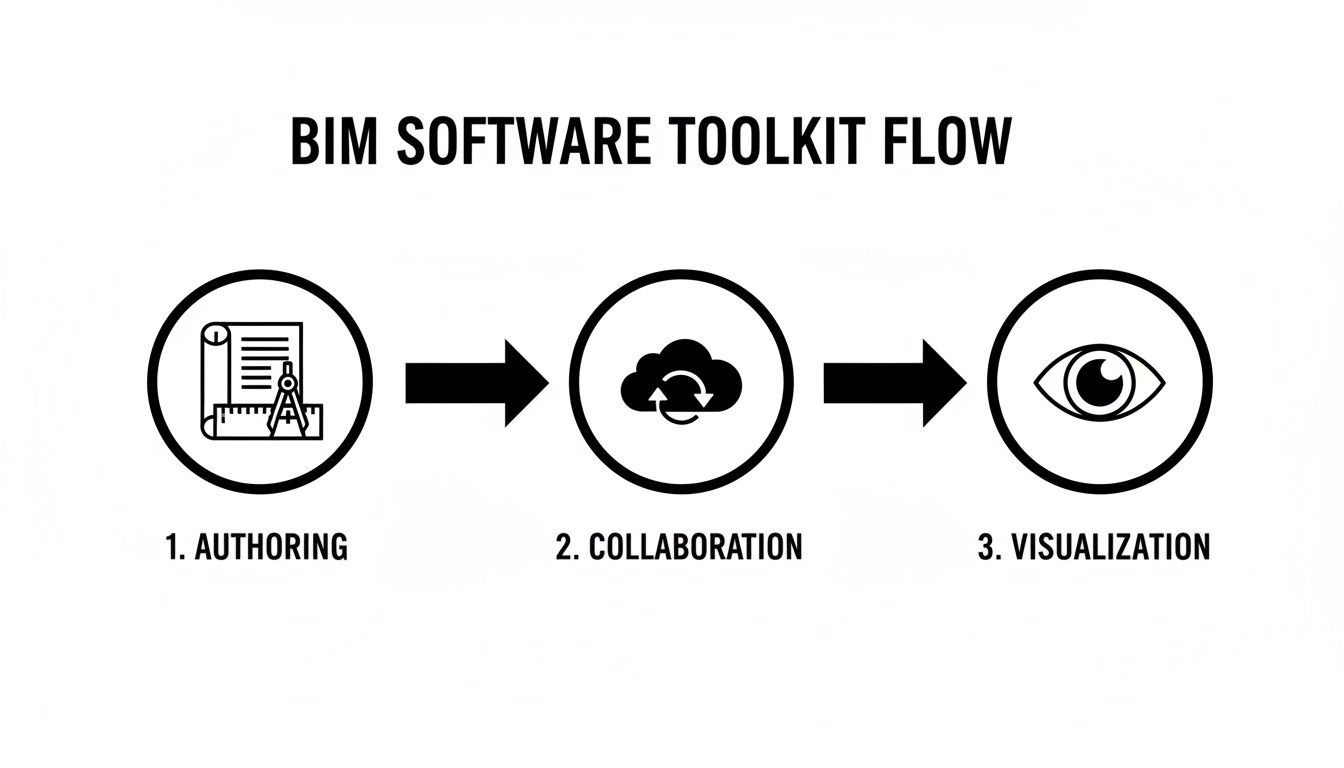
This illustrates a key benefit: a single authored model becomes the source of truth that feeds both collaborative review and client-facing visualizations, ensuring everyone is on the same page.
Phase 2: Invest in Targeted Training and Standards
With a pilot project lined up, it’s time to get your team the right skills. Generic, all-day training sessions rarely stick. You need targeted, role-based training. Your project architect doesn’t need to be an expert in MEP systems, but they absolutely need to master modeling walls, doors, and creating schedules. Tailor the training to what each person actually does day-to-day.
At the same time, you have to develop your firm’s BIM standards. This is your internal rulebook that gets everyone modeling the same way. Without it, you'll have chaos—one person modeling a wall from the interior face while another uses the centerline.
Your first set of standards should cover the fundamentals:
- File Naming Conventions: A clear, logical system for every project file.
- Modeling Protocols: Basic rules for how to create common elements like walls, floors, and roofs.
- Template Development: A starter project template with pre-loaded families, view settings, and title blocks.
A well-defined set of standards is the backbone of an efficient BIM workflow. It ensures every project, no matter who works on it, is built on a consistent and predictable foundation, making collaboration much smoother.
Phase 3: Review and Scale Strategically
Once your pilot project is complete, gather the team for a thorough post-mortem. What went right? What were the biggest headaches? Use these lessons to fine-tune your standards, improve your templates, and adjust your training plan. This feedback loop is crucial for getting better and earning team buy-in for what comes next.
Now, you can start to scale—but do it carefully. Don't go from one small project to ten massive ones. Scale incrementally. Take your refined process and apply it to a project that's just a little bit bigger or slightly more complex. As your team’s confidence grows, you can gradually introduce BIM to more of your work. This methodical approach lets you build on your wins, tackle challenges as they appear, and make the transition stick for good.
Here’s a simple roadmap that outlines this journey from initial planning to full integration.
BIM Implementation Roadmap
This phased checklist can help your architectural firm navigate the adoption of BIM, ensuring a structured and successful transition.
| Phase | Key Actions | Success Metric |
|---|---|---|
| 1. Discovery & Planning | - Define specific BIM goals (e.g., reduce RFIs, improve visualization). - Select a small, low-risk pilot project. - Identify a BIM champion to lead the effort. |
Clear goals are documented and agreed upon by leadership. |
| 2. Training & Standards | - Provide role-specific software training for the pilot team. - Develop basic BIM standards (naming, templates). - Establish a central library for project assets. |
The team can complete basic modeling tasks on the pilot project. |
| 3. Pilot Execution | - Complete the pilot project using the new workflow. - Document challenges, successes, and time spent. - Hold regular check-ins to solve problems. |
The pilot project is successfully delivered using BIM. |
| 4. Review & Refine | - Conduct a post-mortem on the pilot project. - Update standards and templates based on lessons learned. - Gather feedback from the entire team. |
A refined BIM Execution Plan (BEP) is created for future projects. |
| 5. Scaled Rollout | - Apply the refined process to a slightly larger project. - Expand training to more team members. - Continue to build out the component library. |
BIM is successfully used on multiple projects of increasing complexity. |
By following this roadmap, you can make the move to BIM a manageable and rewarding journey for your entire firm.
Bringing a Project to Life with a BIM Workflow
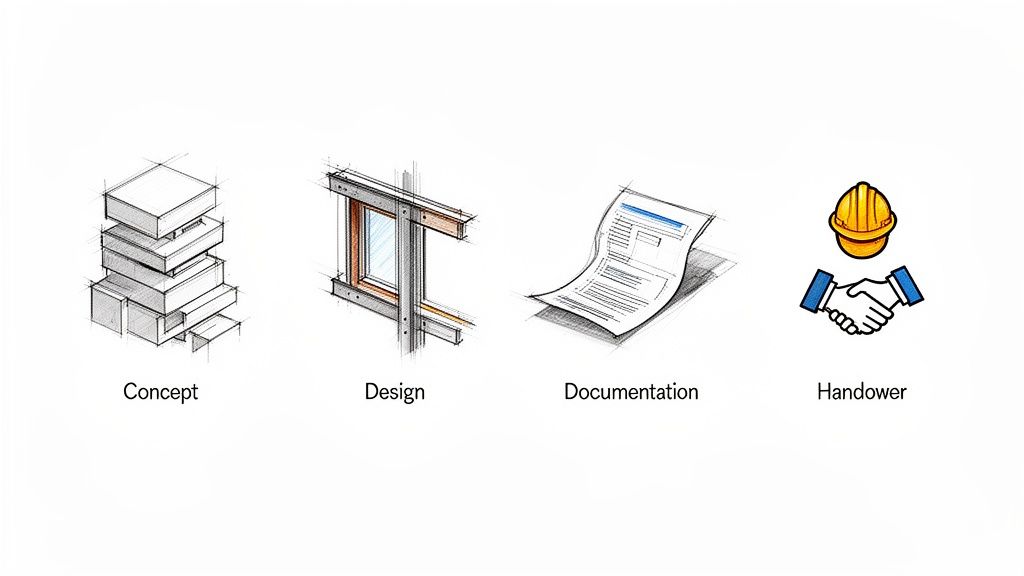
It’s one thing to talk about BIM in theory, but where it really clicks is when you see it in action on a real project. So, let's walk through the typical lifecycle of a design to see how a BIM for architects workflow takes an idea from a napkin sketch to a fully coordinated, buildable reality.
Think of it less as a new software and more as a new way of thinking—a process that guides every decision from the first day to the final handover.
The Conceptual Design Stage
Every project starts with big ideas. In the old days, this meant sketches, physical models, and lots of guesswork. With BIM, you’re building from day one, even if it’s just with simple digital blocks.
Instead of just drawing 2D footprints, an architect can quickly create 3D forms right on the digital site. This isn't just about looks; it's about instant analysis. You can immediately see how the building’s mass casts shadows, what the views will be from a top-floor window, and how the overall scale feels in its environment.
Even these simple shapes are smart. You can run preliminary energy analyses to see how shifting the orientation affects solar gain or use the model to understand the site’s topography. This isn't about getting bogged down in detail; it's about making better high-level decisions, grounded in real data, right from the start.
Moving into Detailed Design
Once the big picture is locked in, you start fleshing out the details. This is where that simple massing model begins its transformation into a true digital twin of the building. Generic shapes get replaced with specific, intelligent components that know what they are.
A conceptual wall, for example, becomes a detailed assembly with all its layers: studs, insulation, drywall, and exterior cladding. Each one of those pieces contains information—its material, its fire rating, maybe even its manufacturer. This happens all over the model.
- Structural elements like beams and columns are modeled to their exact dimensions.
- Windows and doors are placed as "families" that carry performance data with them.
- MEP systems, often handled by engineering consultants, are woven into the same central model.
Suddenly, your model isn't just a collection of lines and surfaces. It’s a rich, coordinated database of every single component that will go into the finished building.
By populating the model with real-world objects and data during the design phase, architects can make more informed decisions about materials, systems, and overall constructability long before breaking ground.
Streamlining Construction Documentation
Ask any seasoned architect about their biggest headache, and they’ll probably mention construction documents. With traditional 2D CAD, creating plans, sections, elevations, and schedules is a painfully manual process. You draw everything separately, and if one thing changes, you have to hunt down and update every related drawing, hoping you don't miss one.
This is where BIM feels like magic. All of your construction documents are simply live views of the one central 3D model.
If you move a window in the 3D model, every single floor plan, elevation, and window schedule updates instantly and automatically. This “single source of truth” approach virtually eliminates the coordination errors that plague 2D workflows, saving an incredible amount of time on tedious checking and redrawing.
Enhancing Collaboration and Visualization
As the model develops, it becomes the central meeting point for the entire project team. The architect, structural engineer, and MEP consultant can all link their models together into one federated view. This allows software to run automated clash detection—a process that flags every single spot where a duct might try to run through a structural beam.
Finding these problems on a screen is a simple fix. Finding them on-site, with crews standing around, is an expensive disaster.
At the same time, this detailed model is your most powerful client communication tool. You can export views directly to visualization platforms like MoldaSpace to create stunning, photorealistic renderings or even immersive VR walkthroughs. This lets clients truly feel the space and understand the design, leading to faster decisions and more confident approvals.
This approach is a massive opportunity, especially for smaller practices. In Japan, for example, while 87.8% of large firms use BIM, adoption falls to between 20% and 36.7% for firms with fewer than 100 employees, according to reports from Grand View Research. This gap shows how small studios and solo architects can gain a serious competitive edge by adopting these smarter, more visual workflows. From that first massing study to the final client presentation, BIM provides a seamless, data-rich thread that holds the entire project together.
Connecting BIM Data to Instant Client Visualizations
One of the most powerful things you can do with a BIM workflow is bring your vision to life for clients, almost instantly. This is where your detailed, technical model becomes a compelling story—a way to bridge the gap between abstract construction data and a design your client can actually see and feel.
Gone are the days of waiting hours, or even days, for a single photorealistic render to finish. The way we work now allows architects to move from a technical model to a stunning visualization with incredible speed.
A New Workflow for Architects
The process itself is refreshingly straightforward. Once you’ve developed your design in a BIM authoring tool like Revit or ArchiCAD, you simply export specific 3D views or camera angles. These aren't just flat images; they're packed with the geometric data needed for the next step.
From there, you bring that data into a specialized visualization tool. Instead of wrestling with complex rendering engines that require a specialist's touch, a new wave of AI-powered platforms can spin up multiple high-quality design options in mere seconds. This speed opens the door to real-time design exploration that used to be out of reach. If you're curious about the mechanics behind this, you can learn more about how cloud-based rendering makes it all happen.
This kind of rapid visualization really levels the playing field. It gives solo architects and smaller firms the power to present ideas with the same professional polish as a large corporation, making it far easier to win proposals and build client trust.
The screenshot below from MoldaSpace shows just how quickly an architect can generate different design styles from a single model view.
This image perfectly illustrates the ability to explore aesthetics like Japandi, Minimalist, or Mid-Century Modern with a few clicks. You can turn one core design into several distinct client presentations in a flash.
From Technical Model to Tangible Vision
This nimble approach completely changes the dynamic of client meetings. You can now tweak designs live, right in the middle of a conversation, adjusting materials or lighting based on immediate feedback. When clients see their suggestions come to life in photorealistic detail, they don't just understand the design—they get excited about it.
This is more than a slick presentation trick; it’s a powerful way to win business. By making your vision tangible and exciting, you help clients connect with the project on an emotional level. Presenting ten design variations is suddenly as easy as presenting one, showcasing your creative range and responsiveness.
Ultimately, BIM for architects isn't just about building better. It's about communicating better. And instant visualization is the key that unlocks that potential.
Answering Your Questions About BIM
Making a big change in how you work always kicks up a few questions. When architects start looking at Building Information Modeling, the big three are usually cost, time, and whether it’s all worth the hassle. Let's tackle those head-on.
Is BIM Just for Huge Firms and Megaprojects?
This is probably the most common misconception I hear about BIM for architects. The truth is, BIM’s advantages scale beautifully to fit any project, big or small. For a small firm or even a solo architect, BIM can be your secret weapon.
Think about it: a central model cuts down on coordination screw-ups just as much on a custom home as it does on a skyscraper. Plus, the time you save by automating things like schedules and drawing sets is a massive win for smaller teams where every hour counts. With more affordable and user-friendly software out there now, BIM is absolutely a practical tool for firms of any size.
What's the Real Cost of Getting into BIM?
Let's be upfront: the initial investment isn't just the price of a software license. You’ve got to factor in training for your team, potential hardware upgrades, and the time it takes for everyone to get comfortable with the new workflow. These costs are real, but it's a mistake to see them as just an expense—it's an investment.
A well-oiled BIM process pays you back by slashing expensive rework on-site, catching errors before they make it into the construction documents, and just making the whole project run smoother. When you look at it that way, the initial spend is almost always dwarfed by the long-term savings.
Here’s a quick breakdown of where the money goes:
- Software: You'll have subscription costs for your main modeling tools, like Revit or ArchiCAD.
- Training: You need to budget for good, focused training to get your team productive quickly. Don't skip this.
- Productivity Dip: Expect a temporary slowdown as everyone finds their footing. It's totally normal, and you need to plan for it.
How Tough Is the Learning Curve, Really?
Switching from flat 2D drawings to a 3D model-centric way of working definitely requires a new mindset. You're not just learning new commands; you're learning a whole new process. The learning curve is there, for sure, but you can manage it with a smart plan.
My advice? Don't try to boil the ocean. Master the basics first. Run a small pilot project to build confidence and figure out what works for your team. Most architects I know say that once they got over that initial hump, they couldn't imagine ever going back. The clarity and coordination you gain in the long run make the initial effort more than worth it.
Ready to bridge the gap between your technical model and a stunning client presentation? MoldaSpace turns your BIM exports into photorealistic renders in seconds, helping you win more proposals and communicate your vision with confidence. Explore how MoldaSpace can elevate your designs.