Mejor software de staging virtual: Compara las mejores herramientas de IA para visuales inmobiliarios
La puesta en escena virtual se trata de tomar fotos de habitaciones vacías y agregar digitalmente muebles y decoración. ¿El objetivo? Transformar un lienzo en blanco en un hogar que se sienta cálido, acogedor y listo para mudarse. Para cualquiera en bienes raíces, es una forma poderosa de ayudar a los compradores a ver el potencial oculto de una propiedad. Cierra la brecha entre un espacio vacío y la imaginación del comprador, todo sin la pesadilla logística y el costo de la puesta en escena física. El mejor software de puesta en escena virtual hoy en día logra esto con una mezcla de velocidad de IA, calidad fotorrealista y una buena dosis de control creativo.
Qué es la puesta en escena virtual y por qué importa para tu negocio
Alguna vez un servicio de nicho, la puesta en escena virtual se ha convertido en una herramienta de marketing imprescindible para agentes inmobiliarios, diseñadores de interiores y arquitectos. Resuelve un problema de ventas clásico: las habitaciones vacías se ven frías y pueden parecer incluso más pequeñas de lo que realmente son. La mayoría de los compradores tienen dificultades para imaginar dónde iría su sofá o cómo un espacio podría funcionar realmente como un hogar, lo que puede llevar a la indecisión y ofertas más débiles.
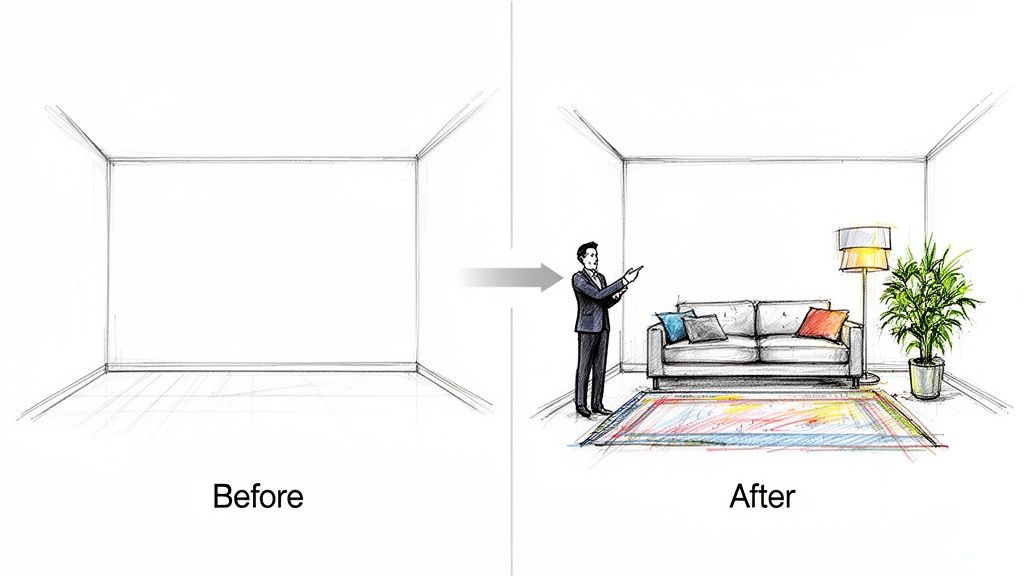
Aquí es donde la tecnología hace su magia. Crea imágenes visuales que cuentan una historia y evocan emoción. En lugar de mirar pisos desnudos, un posible comprador ve una sala de estar acogedora, una oficina en casa productiva o un dormitorio tranquilo. Esa visualización ayuda a construir un puente emocional con la propiedad, que a menudo es el empujón final que necesitan para tomar una decisión. El crecimiento de la industria prueba su valor; un análisis predice que el mercado de software de puesta en escena virtual alcanzará USD 2.07 mil millones para 2033, impulsado por grandes avances en IA. Puedes profundizar en más números en este informe de investigación de mercado.
El cambio de servicios manuales a plataformas de IA
No hace mucho, la puesta en escena virtual era un servicio manual y práctico que tomaba 24-48 horas. Enviarías tus fotos por correo electrónico a una empresa, y un diseñador colocaría cuidadosamente modelos de muebles 3D en cada toma. Funcionaba, pero era lento y los costos podían acumularse rápidamente, especialmente si estabas manejando múltiples listados.
Las plataformas impulsadas por IA de hoy han cambiado completamente el juego. Los profesionales ahora pueden generar imágenes puestas en escena increíblemente realistas en cuestión de segundos. Este cambio en velocidad y acceso tiene enormes beneficios:
- Comercializa propiedades más rápido: Puedes obtener listados en línea con imágenes llamativas casi inmediatamente.
- Muestra múltiples estilos: ¿Quieres probar un look Japandi, Mid-Century o Minimalista? Puedes crear diferentes versiones de la misma habitación para atraer a una audiencia más amplia.
- Reduce costos de marketing: El costo por imagen es una fracción de lo que pagarías por puesta en escena física tradicional o incluso servicios de puesta en escena virtual manual.
- Mejora la comunicación con clientes: Para diseñadores y arquitectos, es una forma brillante de presentar ideas de diseño y obtener retroalimentación instantánea.
La verdadera belleza del software de puesta en escena virtual moderno es que pone la visualización de diseño de alta gama en manos de todos. Le da a agentes individuales y pequeñas empresas el tipo de potencia de marketing visual que solía estar reservada para grandes agencias con bolsillos profundos.
Este nuevo nivel de accesibilidad desbloquea una tonelada de libertad creativa y agilidad empresarial. Ya sea que estés preparando una casa para la venta o presentando un nuevo concepto de diseño, la herramienta correcta ofrece una mezcla inmejorable de velocidad, calidad y asequibilidad. Para una mirada más cercana a lo que es posible, consulta nuestra guía sobre cómo funciona la puesta en escena virtual.
Cómo evaluamos las mejores herramientas de puesta en escena virtual
Elegir el software de puesta en escena virtual correcto no se trata de marcar características en una lista. La verdadera prueba es cómo se desempeña una herramienta cuando estás bajo presión de tiempo. Diseñamos nuestra evaluación desde cero, enfocándonos en lo que realmente importa para agentes, diseñadores y arquitectos en su trabajo diario.
Pusimos cada plataforma a prueba, juzgándola contra un conjunto difícil de criterios. Esto no se trataba de marketing; se trataba de ver qué herramientas podían entregar cuando contaba.
Calidad de imagen fotorrealista
El punto completo de la puesta en escena virtual es hacer que alguien crea que puede mudarse de inmediato. Si un comprador detecta algo falso, la ilusión se rompe. Miramos cada imagen con ojo crítico, buscando los pequeños detalles que separan "lo suficientemente bueno" de lo verdaderamente creíble.
Esto significaba profundizar en algunas áreas clave:
- Sombras e iluminación: ¿Cómo maneja el software la luz? ¿Las sombras proyectadas por ventanas y lámparas son suaves y precisas? ¿Las encimeras y pisos tienen reflejos y reflejos realistas?
- Texturas de materiales: Miramos de cerca las texturas. ¿La veta de la madera se ve real? ¿Casi puedes sentir la tela del sofá? ¿O todo se ve plano y generado por computadora?
- Escala y perspectiva: Nada grita "falso" más rápido que un sofá demasiado grande para una habitación o un sillón en un ángulo extraño. Verificamos que cada pieza de mueble se sintiera como si realmente perteneciera al espacio.
Honestamente, la magia está en la luz. Una herramienta que pueda dominar el brillo suave de una ventana o la forma en que la luz rebota en un piso pulido es una herramienta que entiende qué es el realismo.
Velocidad y tiempo de respuesta
En bienes raíces y diseño, la velocidad lo es todo. Un agente que tiene que esperar 48 horas para fotos ya está rezagado. Un diseñador que necesita maquetas rápidas para un cliente no puede estar esperando renders largos.
Cronometramos cada plataforma desde el momento en que cargamos una foto de habitación vacía hasta que tuvimos una imagen terminada de alta calidad en la mano. La diferencia fue marcada. Las herramientas de IA modernas a menudo entregan resultados en segundos, mientras que los modelos más antiguos basados en servicios pueden tomar 24-48 horas. Esto no es solo sobre conveniencia, se trata de listar propiedades más rápido y obtener retroalimentación inmediata sobre ideas de diseño.
Facilidad de uso y flujo de trabajo
El mejor software debe sentirse como una extensión de tu propia creatividad, no un rompecabezas técnico que tengas que resolver. Abordamos cada herramienta como lo haría un profesional ocupado: alguien que necesita obtener excelentes resultados sin un título en modelado 3D.
Nuestra prueba se enfocó en todo el proceso, de principio a fin:
- Comenzar: ¿Qué tan fácil es cargar una foto y preparar la habitación? ¿Obtienes una guía clara para marcar el espacio?
- Diseñar el espacio: ¿Hay una buena variedad de estilos para elegir? Más importante aún, ¿cuánto control tienes para cambiar muebles, cambiar materiales o ajustar colores?
- Hacer cambios: ¿Qué tan difícil es solicitar una revisión? Algunas de las plataformas de IA más nuevas te permiten hacer cambios con simples indicaciones de texto como "haz el sofá azul", lo que es un ahorro de tiempo masivo.
Un flujo de trabajo suave significa que puedes obtener resultados de aspecto profesional sin una curva de aprendizaje pronunciada. Una herramienta debe convertirse en una parte imprescindible de tu kit de herramientas, no un software frustrante que acumule polvo. Dimos las mejores calificaciones a las plataformas que hicieron que todo el proceso se sintiera casi sin esfuerzo.
Una comparación directa del software líder
Elegir el software de puesta en escena virtual correcto no se trata solo de marcar casillas de características. Se trata de cómo se desempeña la herramienta cuando estás bajo presión de tiempo. Vamos a mirar más allá de la jerga de marketing y comparar cómo las opciones líderes realmente se comparan en el mundo real, examinando las diferencias prácticas que afectan tu flujo de trabajo, tu presupuesto e, en última instancia, tus imágenes finales.
Las mejores herramientas se juzgan en algunos pilares centrales: la calidad de la imagen final, qué tan rápido puedes hacerlo y qué tan fácil es usar el software. Estos son los factores que hacen o rompen.
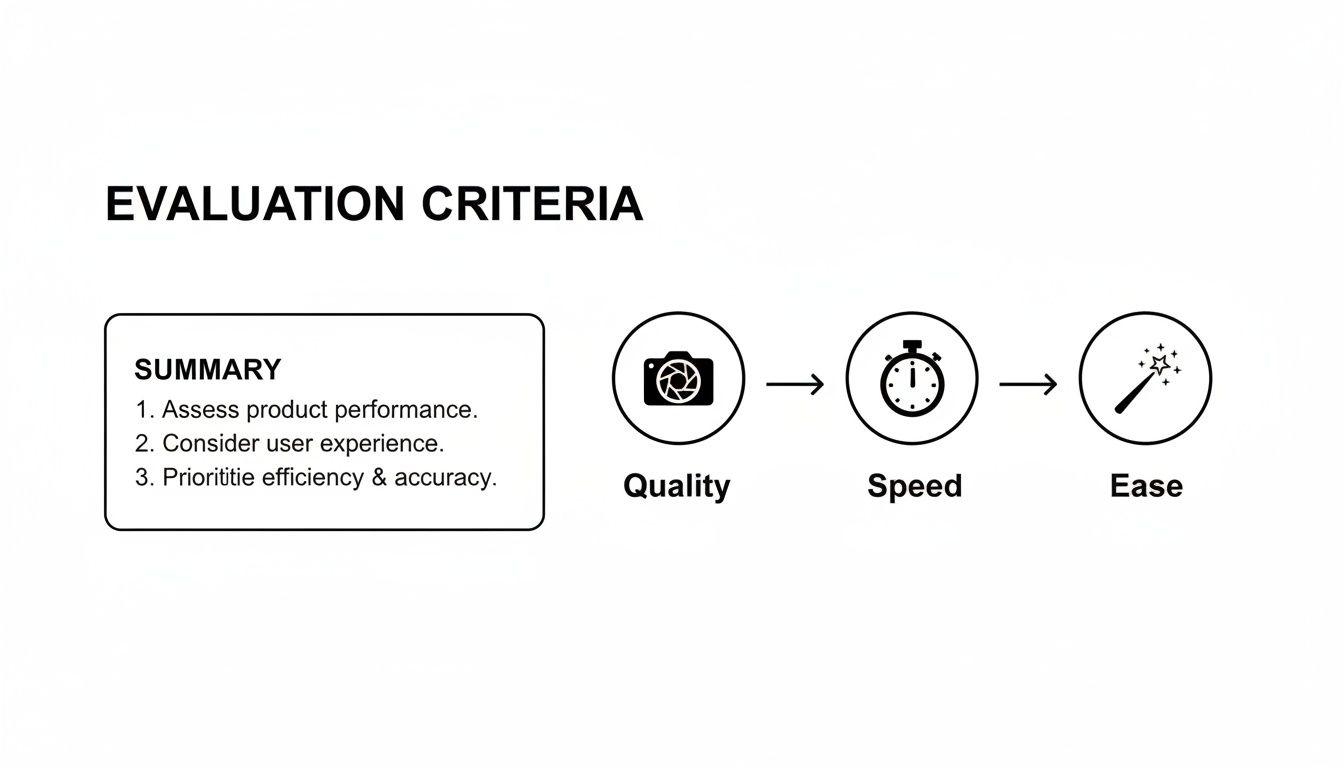
Es en estas tres áreas donde encontrarás la mayor brecha entre plataformas modernas impulsadas por IA y las empresas más tradicionales basadas en servicios.
Los veteranos vs. IA: Una división fundamental
El mundo de la puesta en escena virtual se divide en dos campamentos principales. Tienes las empresas establecidas basadas en servicios como BoxBrownie y Virtual Staging Solutions, donde envías tus fotos a un equipo de diseñadores humanos. Luego tienes las plataformas impulsadas por IA, como MoldaSpace, que ponen las herramientas directamente en tus manos y automatizan el trabajo pesado.
Durante años, los servicios tradicionales eran el único juego en la ciudad. Ofrecen un toque humano, lo cual es excelente, pero eso viene con un retraso incorporado. Casi siempre estás mirando una espera de 24 a 48 horas. Ese tipo de retraso puede ser un factor decisivo para un agente inmobiliario que intenta obtener un listado antes de la prisa del fin de semana o un diseñador de interiores que necesita mostrar a un cliente algunas ideas rápidas.
Las herramientas de IA han cambiado completamente el juego en este frente. Pueden tomar una imagen y generar un diseño completamente puesta en escena en segundos, convirtiendo un proceso de varios días en algo que puedes terminar en menos de un minuto. Este cambio en el flujo de trabajo es la diferencia más grande para profesionales que necesitan moverse rápido.
Velocidad y flujo de trabajo: Un desglose práctico
Caminemos a través de un escenario común: un agente inmobiliario necesita poner en escena cinco fotos para una casa de tres dormitorios (sala de estar, dormitorio principal, segundo dormitorio, comedor y oficina).
Con un servicio tradicional (como BoxBrownie):
- El agente carga las cinco fotos de habitaciones vacías.
- Para cada foto, tiene que completar un resumen describiendo el estilo que desea: Moderno, Granja, etc.
- Envía el pedido y luego... espera. En el mejor de los casos, son 24 horas.
- ¿Necesitas un cambio? Quizás el cliente odia el sofá. Eso significa otra solicitud de revisión y otras 12-24 horas de espera.
Con una plataforma de IA (como MoldaSpace):
- El agente carga la primera foto.
- Hace clic en un estilo como "Japandi" o "Minimalista". Aproximadamente 30 segundos después, tienen una imagen completamente puesta en escena.
- Si quieren un look diferente, pueden escribir un comando simple como "cambia el sofá a un seccional gris", y obtener una nueva versión al instante.
- Pueden terminar las cinco fotos, con múltiples variaciones para cada una, en menos de 10 minutos.
La diferencia es de noche y día. Un camino implica días de correos electrónicos de ida y vuelta y espera, mientras que el otro ofrece resultados inmediatos y libertad creativa total. Cuando estás manejando múltiples proyectos, ese tiempo ahorrado significa obtener listados en línea más rápido y mantener a los clientes felices.
Calidad y realismo: Una mirada matizada
El fotorrealismo es el objetivo final, y es donde el debate a menudo se calienta. Tanto los servicios tradicionales como la IA de primer nivel pueden entregar imágenes impresionantes, pero sus enfoques son diferentes. Los diseñadores humanos en un lugar como Virtual Staging Solutions son maestros del detalle, especialmente en espacios complicados con iluminación inusual. Su fortaleza está en ese toque personalizado y práctico.
Sin embargo, la IA moderna está alcanzando a un ritmo increíble. Plataformas como MoldaSpace se entrenan en millones de fotos de interiores de alta gama, por lo que tienen una comprensión profunda de cómo funcionan juntos la luz, la sombra y la textura. La IA no solo coloca muebles; crea una escena cohesiva y creíble.
El verdadero ventaja para la IA es la iteración. Si no te encanta el primer resultado, estás a segundos de uno nuevo. Intentar lograr ese nivel de experimentación con un servicio manual sería increíblemente lento y costoso. Si te interesa el funcionamiento interno de la creación de imágenes fotorrealistas, nuestra guía sobre el mejor software de renderizado 3D para diseño de interiores entra en mucho más detalle.
Matriz de características del software de puesta en escena virtual
Esta tabla ofrece una comparación directa de características clave en el software de puesta en escena virtual superior, ayudándote a identificar rápidamente el mejor ajuste para tu flujo de trabajo.
| Característica | MoldaSpace | Competidor A (Tradicional) | Competidor B (IA) | Competidor C (Tradicional) |
|---|---|---|---|---|
| Tiempo de respuesta | ~30 segundos | 24-48 horas | ~1 minuto | 24 horas |
| Control sobre el estilo | Alto (Indicaciones de texto) | Medio (Selección de estilo) | Medio (Selección de estilo) | Bajo (Elección del diseñador) |
| Revisiones | Instantáneas e ilimitadas | 12-24 horas por ronda | Instantáneas | 24 horas por ronda |
| Modelo de costo | Créditos / Suscripción | Pago por imagen | Suscripción | Pago por imagen |
| Biblioteca de muebles | Generada por IA | Biblioteca seleccionada | Generada por IA | Biblioteca seleccionada |
| Facilidad de uso | Muy alta (Autoservicio) | Alta (Enviar y esperar) | Alta (Autoservicio) | Media (Resúmenes detallados) |
| Derechos de salida | Uso comercial completo | Uso comercial completo | Uso comercial completo | Uso comercial completo |
Como puedes ver, la elección a menudo se reduce a un compromiso entre el control práctico y la velocidad de la IA versus el enfoque dirigido por diseñador de los servicios tradicionales.
Costo y propuesta de valor
El precio también cuenta una historia sobre los diferentes modelos de negocio.
Basado en servicios (pago por imagen):
- BoxBrownie cobra alrededor de $24 por imagen.
- Virtual Staging Solutions típicamente está en el rango de $29 a $49 por foto.
- Esto es simple, pero se suma rápidamente. Poner en escena esa propiedad de cinco fotos de la que hablamos te costaría entre $120 a $245.
Basado en IA (créditos o suscripción):
- MoldaSpace opera en un sistema de créditos. Un paquete de $19 te da 40 generaciones, lo que funciona a menos de $0.50 por imagen.
- Este modelo ofrece un valor increíble, especialmente para cualquiera que necesite poner en escena un alto volumen de propiedades o simplemente quiera experimentar sin un recuento corriendo en su cabeza. Ese mismo trabajo de cinco fotos podría hacerse con docenas de variaciones por solo un par de dólares.
Los datos del mercado confirman este cambio. Mientras que jugadores establecidos como Virtual Staging Solutions y BoxBrownie han construido negocios sólidos en el modelo de servicio, la industria se está moviendo hacia soluciones más ágiles. Más del 70% de las nuevas implementaciones ahora son herramientas de IA basadas en la nube, y con profesionales de bienes raíces representando más del 60% de la base de usuarios, la demanda de velocidad y escalabilidad es clara. Puedes profundizar en más de estos datos en la cuota de mercado de puesta en escena virtual en MarketResearch.com.
En última instancia, la mejor opción depende de lo que valores más. Si tienes un proyecto único y altamente complejo y el tiempo no es un factor, un servicio tradicional podría funcionar. Pero para el profesional moderno que necesita velocidad, control creativo y eficiencia de costos, las plataformas de IA como MoldaSpace son un ajuste mucho más fuerte.
¿Cuál es la herramienta de puesta en escena virtual adecuada para ti?
Elegir el software de puesta en escena virtual correcto no se trata de encontrar una única opción "mejor", se trata de encontrar el ajuste correcto para tu trabajo específico. La herramienta perfecta para un agente inmobiliario que intenta obtener un listado en línea para mañana es completamente diferente de lo que necesita un diseñador de interiores para crear una presentación ganadora para clientes.
Tu rol, objetivos del proyecto y el equilibrio que necesitas entre velocidad, libertad creativa y costo te señalarán la solución ideal. Desglosemos algunos escenarios comunes para ver qué plataforma tiene más sentido para diferentes flujos de trabajo. Veremos las demandas únicas de tres profesionales distintos para ayudarte a encontrar el software que genuinamente se convertirá en una parte imprescindible de tu kit de herramientas.
Para el agente inmobiliario que necesita velocidad y volumen
El mundo de un agente inmobiliario gira en torno a malabarear múltiples listados y cumplir con plazos de marketing ajustados. La velocidad y la eficiencia no son solo agradables de tener; lo son todo. El objetivo principal es obtener fotos impresionantes y aspiracionales de una nueva propiedad en línea inmediatamente para captar la atención del comprador desde el primer día.
En este entorno acelerado, esperar 24-48 horas para que un servicio de puesta en escena tradicional devuelva imágenes es un obstáculo importante. Ese retraso puede retrasar el lanzamiento de un listado y ralentizar todo el proceso de ventas.
El software ideal tiene que ofrecer:
- Respuesta casi instantánea: Deberías poder cargar una foto de una habitación vacía y obtener una imagen puesta en escena en segundos, no días.
- Capacidad de alto volumen: El modelo de costo tiene que tener sentido para poner en escena cada habitación en cada listado, no solo las tomas principales.
- Curva de aprendizaje cero: Necesitas una interfaz intuitiva que no requiera ningún trasfondo de diseño. El objetivo es obtener resultados profesionales y pasar a lo siguiente en tu lista.
- Variedad de estilos relevantes: Necesitas una biblioteca sólida de estilos populares, como Moderno, Granja o Escandinavo, para que coincida con la arquitectura de la casa y atraiga a los compradores más probables.
Para un agente, poder generar cinco opciones de estilo diferentes para una sala de estar en menos de tres minutos es un superpoder. Te permite hacer pruebas A/B de fotos en el MLS o personalizar materiales de marketing para diferentes perfiles de compradores, todo sin el ir y venir de solicitudes de revisión.
Por estas razones, una plataforma impulsada por IA como MoldaSpace es un cambio de juego. Su tiempo de procesamiento de menos de un minuto y precios basados en créditos (a menudo menos de un dólar por imagen) se alinean perfectamente con el flujo de trabajo de un agente. La capacidad de ajustar instantáneamente un diseño con un simple indicación de texto te da un nivel de agilidad que los servicios tradicionales simplemente no pueden competir, lo que lo convierte en el mejor software de puesta en escena virtual para profesionales que viven y mueren por velocidad y escala.
Para el diseñador de interiores que busca control creativo
Las prioridades de un diseñador de interiores son casi el espejo opuesto de las de un agente. Si bien la velocidad siempre es un plus, el verdadero enfoque está en la expresión creativa, la precisión y la comunicación de una visión de diseño muy específica. Aquí, el software no es solo un truco de marketing; es una parte central del proceso creativo.
Los diseñadores necesitan control granular. No es suficiente solo elegir un estilo preestablecido. Necesitan poder sumergirse y refinar los detalles: cambiar una silla específica, ajustar la textura de una alfombra o ajustar un color de pared hasta que encarne perfectamente su concepto.
El software ideal tiene que ofrecer:
- Personalización profunda: El poder de modificar elementos individuales, desde la tela de un sofá hasta la especie de madera en el piso.
- Biblioteca extensa de estilos y muebles: Un catálogo sofisticado y profundo de muebles, arte y materiales que refleje las tendencias de diseño actuales, no solo artículos de stock genéricos.
- Fotorrealismo inquebrantable: La calidad de renderizado impecable es innegociable. La iluminación, las sombras y las texturas deben verse completamente convincentes para presentaciones de clientes y piezas de cartera.
- Un flujo de trabajo iterativo: La libertad de experimentar es clave. Necesitas generar múltiples variaciones rápidamente para explorar diferentes caminos creativos con un cliente.
Cualquier plataforma con un resultado rígido de "uno y listo" simplemente no funcionará para un diseñador. Una herramienta de IA como MoldaSpace golpea el punto dulce entre velocidad y control. Un diseñador puede generar un concepto inicial en segundos y luego usar simples indicaciones de texto, como "agregar una mesa de café de mármol con patas de latón" o "cambiar el color de la pared a un gris oscuro", para iterar y perfeccionar el diseño en tiempo real. Este ciclo de retroalimentación inmediata es increíblemente poderoso, especialmente durante una revisión de cliente.
Para el arquitecto que visualiza conceptos
Para los arquitectos, las herramientas de visualización se tratan de cerrar la brecha entre un plano 2D y un espacio que alguien pueda imaginar viviendo. El objetivo es comunicar la escala, el flujo y el potencial de un diseño mucho antes de que se coloque un solo ladrillo. El software debe traducir dibujos técnicos en imágenes que conecten con las personas a nivel emocional.
Aquí, el contexto y el realismo son primordiales. La herramienta tiene que representar con precisión los materiales previstos, cómo la luz llenará el espacio y la visión arquitectónica general. Es la prueba de concepto definitiva para clientes, inversores y comités de planificación.
El software ideal tiene que ofrecer:
- Integración con modelos 3D: Necesita funcionar bien con exportaciones de software arquitectónico central como SketchUp, Revit o ArchiCAD.
- Renderizado realista de iluminación y materiales: Necesitas simulación avanzada de luz natural y artificial, más la capacidad de renderizar con precisión materiales como hormigón, vidrio y madera.
- Exploración conceptual: El poder de generar rápidamente diferentes escenarios interiores es crucial para mostrar la versatilidad de un espacio.
Si bien muchos arquitectos eventualmente recurrirán a motores de renderizado de alta gama como V-Ray para imágenes de marketing finales, una plataforma de IA como MoldaSpace ofrece una ruta mucho más rápida para visualizaciones preliminares. Un arquitecto puede exportar una vista 3D básica, cargarla y obtener varios conceptos completamente amueblados casi al instante. Esto les permite mostrar a los clientes imágenes convincentes del potencial de un proyecto en la fase de diseño inicial, ayudando a asegurar la compra sin invertir horas en configuración de renderizado manual.
Una mirada dentro del flujo de trabajo de MoldaSpace
Es una cosa hablar sobre características, pero es otra ver una herramienta en acción. Caminemos a través de todo el proceso de MoldaSpace para mostrarte cómo una plataforma de IA moderna puede tomar una habitación vacía y crear un visual impresionante y listo para clientes en menos de un minuto.
Esto no se trata de necesitar un trasfondo en modelado 3D o diseño. El punto completo es darte velocidad y control creativo, haciendo que resultados de calidad profesional sean accesibles para cualquiera.
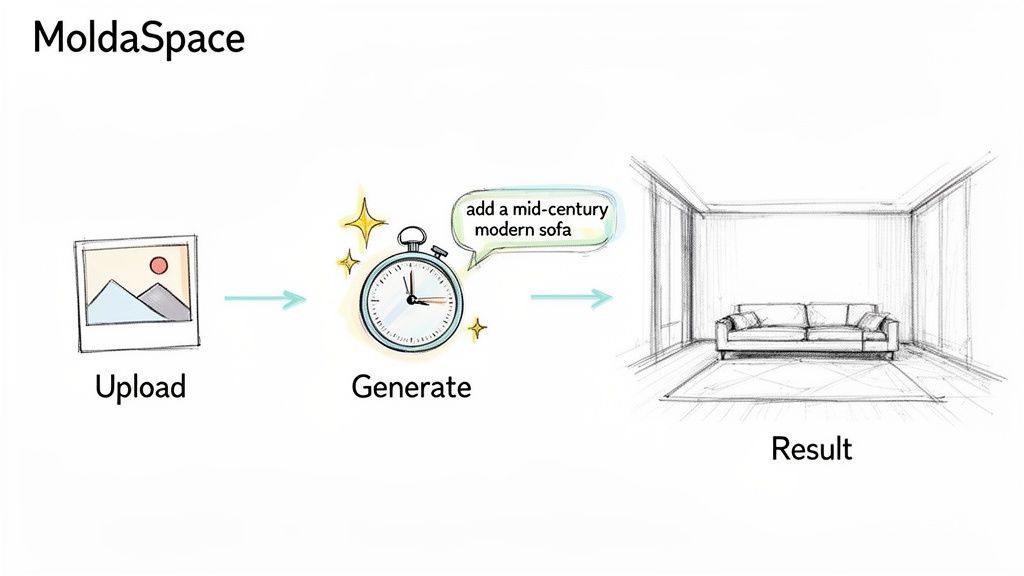
Paso 1: Carga tu foto de habitación vacía
Todo comienza con una foto limpia y clara del espacio vacío. Para obtener los mejores resultados, usa una imagen que esté bien iluminada y tomada desde un ángulo que realmente muestre el diseño de la habitación. MoldaSpace funciona con archivos estándar JPEG o PNG, por lo que las fotos directamente de una cámara profesional o incluso un smartphone de alta calidad funcionarán bien.
Solo arrastra y suelta tu imagen elegida en el cargador de MoldaSpace. La IA de la plataforma se pone a trabajar inmediatamente, analizando la geometría de la habitación, la perspectiva y la iluminación. Todo este análisis automatizado toma solo unos pocos segundos.
Paso 2: Define el espacio y elige un estilo
A continuación, le darás a la IA un poco de contexto. Usando herramientas simples en pantalla, marcarás rápidamente el piso, las paredes y el techo. Este paso rápido es lo que permite a la IA colocar muebles de manera realista y proyectar sombras que se ven naturales.
Una vez que el espacio está mapeado, comienza la diversión. MoldaSpace tiene una biblioteca seleccionada de estilos populares de diseño de interiores para elegir. Algunas opciones incluyen:
- Japandi: La mezcla perfecta del minimalismo japonés y la función escandinava.
- Mid-Century Modern: Se trata de líneas limpias, formas orgánicas y esas piezas de muebles icónicas.
- Minimalista: Se enfoca en la simplicidad, colores neutrales y mantener los espacios sin desorden.
- Industrial: Construido sobre materiales crudos como ladrillo expuesto, metal y madera recuperada.
Solo haz clic en el estilo que se ajuste a la propiedad o la visión de tu cliente. Esta opción le dice a la IA qué tipo de muebles, paleta de colores y vibra general comenzar.
La verdadera magia aquí no es solo elegir un estilo. Es la capacidad de generar múltiples opciones de estilo para la misma habitación, al instante. Puedes mostrar a un cliente cómo su espacio podría verse como tanto un retiro acogedor escandinavo como un loft industrial elegante, todo sin trabajo adicional.
Paso 3: Genera y ajusta con inglés simple
Con un estilo seleccionado, presiona "Generar". En aproximadamente 30 segundos, MoldaSpace entrega una imagen completamente amueblada y fotorrealista. El primer resultado a menudo es lo suficientemente bueno para usar de inmediato, pero la verdadera fortaleza de la plataforma es lo fácil que es refinar.
Aquí es donde tomas el control usando simples indicaciones de texto conversacionales. Olvida navegar menús confusos, solo escribe lo que quieres cambiar.
Algunos ejemplos de indicaciones de refinamiento:
- "Agrega una pintura abstracta grande en la pared principal."
- "Cambia el sofá a un seccional de terciopelo verde oscuro."
- "Haz las paredes de un color gris claro y suave."
- "Coloca una planta de hoja de violín en la esquina."
Cada indicación genera una nueva versión en segundos, permitiéndote iterar a velocidad de rayo. Convierte el proceso de diseño en un ir y venir creativo, permitiéndote experimentar hasta que la imagen sea exactamente lo que tenías en mente. Si quieres profundizar, puedes aprender más sobre los avances en renderizado de IA.
Todo este flujo de trabajo convierte la puesta en escena virtual de una tarea lenta y externalizada en una herramienta creativa inmediata y práctica.
Tus preguntas sobre puesta en escena virtual, respondidas
Saltar al software de puesta en escena virtual puede sentirse como un gran paso, y es natural tener preguntas. Estás tratando de averiguar si es el movimiento correcto para tu negocio, ya seas un agente, diseñador o arquitecto. Aclaremos algunas de las preguntas más comunes que las personas tienen sobre cómo funciona todo, qué cuesta y qué puedes esperar.
Iremos directo al punto en las cosas que más importan: desde qué tan real se ven las imágenes hasta qué puedes hacer con ellas una vez que estén terminadas.
¿Qué tan realista es la puesta en escena virtual?
Esta es probablemente la pregunta número uno, y es una crítica. Si un posible comprador puede decir que es falso, todo el efecto se arruina. La verdad es que el realismo depende de la tecnología detrás de la herramienta. Los servicios de puesta en escena manual más antiguos dependen de la habilidad de un diseñador para acertar la iluminación y la perspectiva, lo que puede producir excelentes resultados pero toma tiempo.
Las plataformas de IA avanzadas de hoy, como MoldaSpace, se entrenan en millones de fotografías de interiores de alta gama. Esto significa que la IA tiene una comprensión profunda de cómo la luz debe rebotar en un piso de madera dura o cómo una sombra debe extenderse desde un sofá colocado junto a una ventana. Las mejores herramientas disponibles ahora crean imágenes que son casi imposibles de distinguir de una foto profesionalmente tomada, dominando las texturas, sombras y escala cada vez.
¿Vale la pena el costo de la puesta en escena virtual?
Sin duda. El ROI en puesta en escena virtual es probado e impresionante. Por una inversión muy pequeña, puedes cambiar completamente cómo se percibe una propiedad, haciéndola mucho más atractiva para los compradores, lo que a menudo conduce a ventas más rápidas y mejores ofertas.
Los números realmente hablan por sí solos. Una pequeña inversión de $350 en puesta en escena virtual para una propiedad de $400,000 puede aumentar su valor percibido entre $4,000 a $40,000. Eso es un aumento de 1-10%, dependiendo del mercado. Mirando el panorama general, los datos muestran que las casas puestas en escena virtualmente se venden hasta 87% más rápido y por hasta 15% más. Puedes profundizar en el impacto de la puesta en escena virtual en las ventas de propiedades para ver los datos.
Cuando lo piensas, el costo de la puesta en escena virtual de IA puede ser menos de un dólar por imagen. Compáralo con los miles que gastarías en puesta en escena física, y el valor es cristalino. Es una herramienta de marketing de bajo costo y alto impacto.
¿Puedo usar las imágenes puestas en escena en cualquier lugar?
Sí. Cualquier plataforma de puesta en escena virtual respetable te dará derechos de uso comercial completo para las imágenes que generes. Esto significa que eres libre de usarlas en todos tus canales de marketing sin preocuparte por restricciones.
Típicamente, esto cubre lo esencial:
- Listados de propiedades: Tu MLS local, Zillow y otros sitios de bienes raíces.
- Sitios web y carteras: Para mostrar tus listados o trabajo de diseño.
- Redes sociales: Para publicaciones atractivas en Instagram, Facebook, LinkedIn, etc.
- Materiales impresos: En volantes, folletos y correo directo.
Siempre es inteligente darle una lectura rápida a los términos de servicio de cualquier herramienta que elijas, pero el estándar de la industria es proporcionar activos que te ayuden a comercializar tus propiedades y hacer crecer tu negocio. Esto asegura que tu inversión siga pagando dividendos en todas las plataformas que uses.
¿Listo para verlo en acción? Convierte tus listados vacíos en hogares hermosamente amueblados en solo unos pocos clics. Con MoldaSpace, puedes crear imágenes realistas impresionantes usando IA y obtener una ventaja real en tu mercado. Pruébalo y ve qué tan simple puede ser la puesta en escena virtual profesional.